How to Add a Bible Reader to Your Church Website
Most church websites link out to Bible Gateway or YouVersion when they want to reference Scripture. The problem? Your visitors leave your site, and they may not come back. They land on someone else's platform, see ads, get distracted, and your church website loses them.
There's a better way: host a full Bible reader directly on your own website. Your congregation reads Scripture on your domain, in your ministry's environment, with no ads or third-party tracking.
BibleBridge is a free WordPress plugin you can install in under 60 seconds. No account, no credit card, no coding. One click from your WP admin and your church has a full Bible reader.
What you get
BibleBridge isn't an embed or an iframe. It's a full-featured Bible reader that runs on your server:
You can see it live here. That's exactly what your visitors would get.
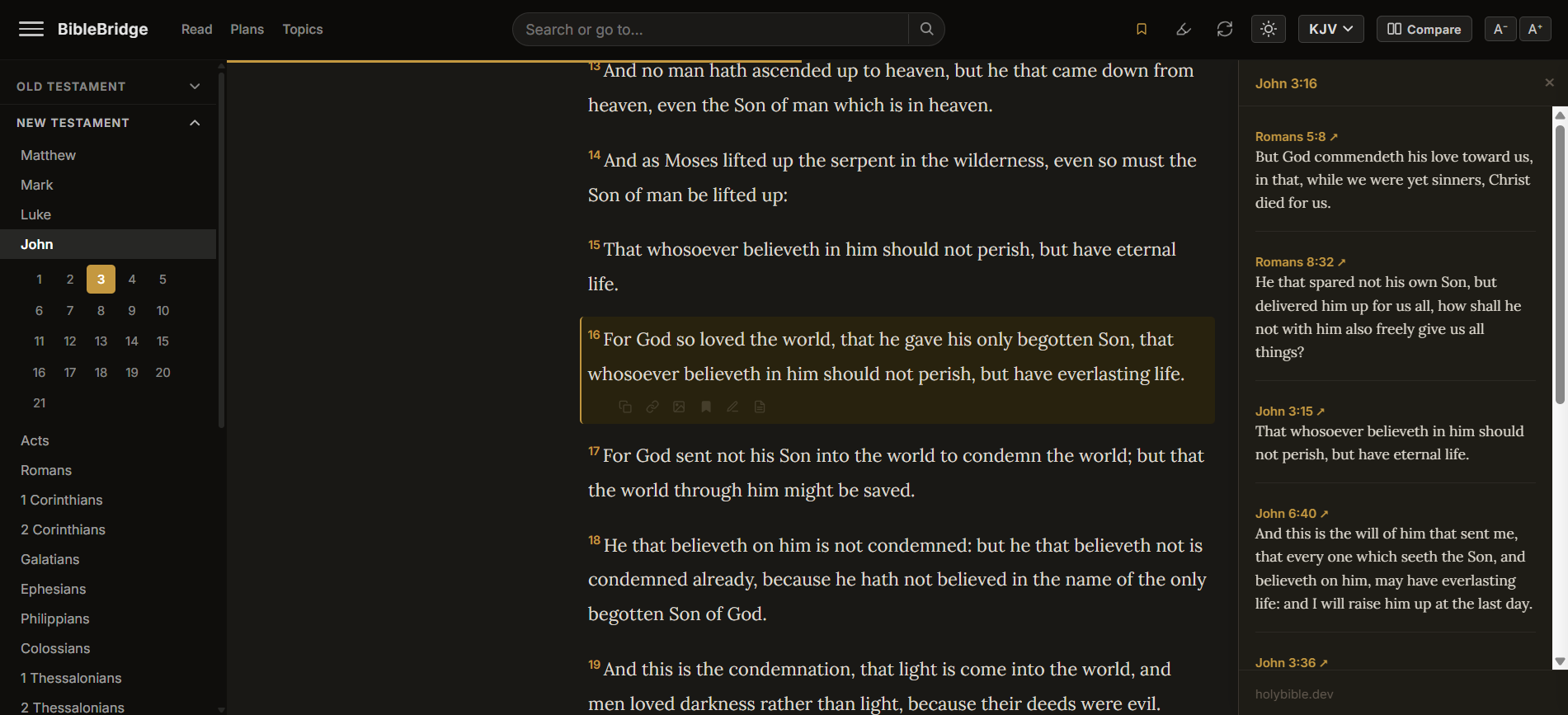
How to install it (3 steps, under 60 seconds)
Go to Plugins → Add New in your WordPress admin
In your WP dashboard, click Plugins in the left sidebar, then Add New Plugin at the top.
Search for "BibleBridge" and install
Type BibleBridge in the search box. Click Install Now, then Activate.
Your Bible is live
Visit yoursite.com/bible. A free API key is provisioned automatically, no signup, no email, no account. To customize your reader name or URL, go to Settings → BibleBridge.
That's it. No account to create, no config files to edit, no credit card. The entire process takes under 60 seconds.
Why not just link to Bible Gateway?
| Bible Gateway | BibleBridge | |
|---|---|---|
| Readers stay on your site | No, opens external site | Yes, your domain |
| Third-party ads | Yes | No |
| Tracking | Yes | No |
| Your branding | No | Yes |
| Search | Limited embed | Full search with book filtering |
| Cross-references | No | Yes |
| Reading plans | No | Yes |
| Verse shortcodes | No | Yes, embed any verse anywhere on your site |
| Cost | Free (with ads) | Free (no ads) |
Requirements
BibleBridge is a standard WordPress plugin. It works on any WordPress installation running version 5.8 or newer, PHP 8.0+, and any reputable host. No special server configuration needed.
Pricing
The free plan includes every feature and handles about 50 daily readers. That's more than enough for most church websites.
If your church grows beyond that, the Growth plan ($14/mo) handles ~500 daily readers, and Scale ($29/mo) handles ~2,000. You can upgrade anytime from your dashboard, no migration, no reinstallation.
Try it in 60 seconds
One click from your WordPress admin. No account, no credit card, no commitment. Remove it anytime: Plugins → Deactivate → Delete.
Install on WordPress (Free)Questions?
If you run into any issues installing BibleBridge or need help getting it set up on your church website, send us a message. We're happy to help with installs, hosting questions, or anything else.