Scriptural Data Visualization (Python)
Client-side Scripture analysis using canonical Bible text
Beyond display-only applications, Scripture text can also be treated as structured data for linguistic, educational, or analytical purposes. This example demonstrates how to use the BibleBridge API as a reliable source of canonical text while performing all analysis locally.
The API is used strictly to retrieve Scripture by reference. Keyword counting, visualization, and interpretation are handled entirely by the client application.
What This Example Does
- Iterates through chapters of a Bible book
- Fetches canonical Scripture text via the BibleBridge API
- Processes verse text locally for word-frequency analysis
- Visualizes the most prominent themes
This approach avoids expensive server-side search while providing maximum flexibility to the application developer.
About Stop Words
When analyzing large bodies of text, certain words occur frequently but do not convey thematic meaning. These include articles, pronouns, conjunctions, and common connective terms.
This example filters a small set of common and archaic English stop words (including KJV-specific forms) to surface meaningful concepts such as wisdom, righteousness, instruction, and understanding rather than grammatical filler.
Stop word filtering is performed entirely client-side and can be customized or removed depending on the goals of the analysis.
Python Example
This Python script fetches each chapter of Proverbs (KJV), performs word-frequency analysis, and generates a simple visualization showing the top ten thematic terms. Progress output is included to make execution easy to follow.
import os
import requests
import re
from collections import Counter
import matplotlib.pyplot as plt

API_BASE = "https://holybible.dev/api/scripture"
API_KEY = os.getenv("BIBLEBRIDGE_API_KEY")

if not API_KEY:
    raise RuntimeError("Missing BIBLEBRIDGE_API_KEY. Set it as an environment variable.")

BOOK_ID = 20
CHAPTERS = 31
VERSION = "KJV"

HEADERS = {
    "Authorization": f"Bearer {API_KEY}"
}

STOPWORDS = {
    "the", "and", "of", "to", "in", "is", "that", "for", "with", "as",
    "on", "be", "are", "by", "this", "which", "or", "it", "from",
    "at", "there", "when", "but", "not",
    "a", "an", "i", "my", "me", "mine",
    "him", "his", "her", "hers", "they", "them", "their",
    "he", "she", "we", "us", "our",
    "ye", "thou", "thee", "thy", "thine",
    "hath", "had", "have", "having",
    "shall", "will", "may", "might",
    "unto", "thereof", "wherefore",
    "all", "own", "so", "than", "son", "s"
}

def normalize(text):
    words = re.findall(r"\b[a-z]+\b", text.lower())
    return [w for w in words if w not in STOPWORDS]

word_counts = Counter()

for chapter in range(1, CHAPTERS + 1):
    print(f"Fetching Proverbs {chapter}/{CHAPTERS}")

    response = requests.get(
        API_BASE,
        headers=HEADERS,
        params={
            "bookID": BOOK_ID,
            "chapter": chapter,
            "version": VERSION
        },
        timeout=5
    )

    response.raise_for_status()
    payload = response.json()

    for verse in payload["data"]:
        word_counts.update(normalize(verse["text"]))

words, counts = zip(*word_counts.most_common(10))

plt.bar(words, counts)
plt.title("Top 10 Key Themes in Proverbs (KJV)")
plt.ylabel("Frequency")
plt.xticks(rotation=45, ha="right")
plt.tight_layout()
plt.show()
Note: This example processes the entire book of Proverbs and may exceed free-tier rate limits. For sustained or large-scale analysis, use a Production API key to avoid throttling.
Example Visualization
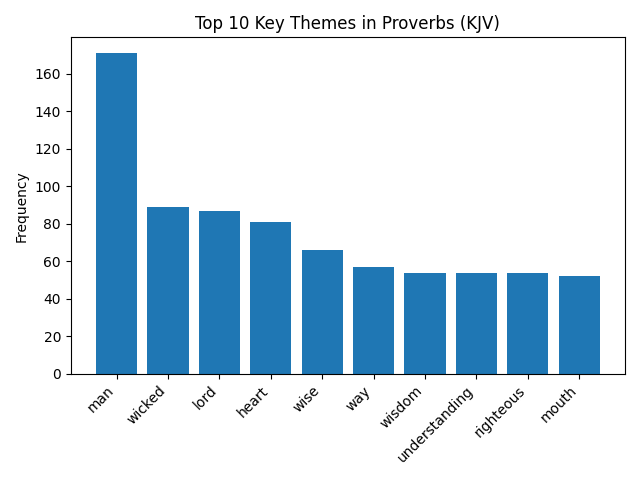
The following chart was generated by running the script above. It shows the ten most prominent thematic terms in Proverbs (KJV) after stop word filtering.
Why Client-Side Analysis?
Full-text search and linguistic analysis can be computationally expensive and are highly application-specific. By performing analysis locally, applications gain flexibility while keeping API performance predictable.
The BibleBridge API intentionally focuses on fast, canonical Scripture retrieval rather than interpretation, ranking, or semantic inference.
Next Steps
- Generate alternate visualizations such as word clouds
- Compare thematic trends across different books
- Cache retrieved chapters for offline or repeated analysis
For full endpoint details, see the BibleBridge API documentation.